Recent updates

Follow new updates and improvements to Upheal.

September 21st, 2026

This week brings two updates that cut down on busywork: you can now talk to Upheal Assistant instead of typing, and Reports got easier to use.

Speak to Upheal Assistant

Tap the microphone icon wherever you'd normally type to Assistant and speak your request instead. It works for anything you'd type: asking a question, requesting a summary, or dictating an update, so your hands stay free between clients.

Reports are now easier to use

Download the data, not just the picture: open the menu on any report and choose Download report, then pick Image or Spreadsheet. The spreadsheet gives you the headline numbers and full chart values, handy for handing off to a bookkeeper or building your own summary. The image download and expanded view now include those headline stats too, so what you see matches what you get.
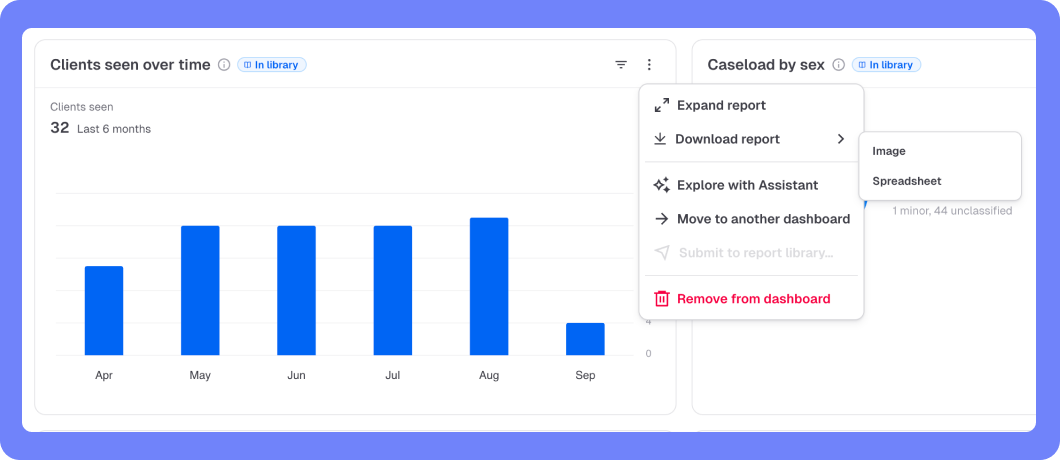
Ask Upheal Assistant about a report: choose Explore with Assistant from any report's menu to ask questions about it directly, the same way you'd ask about a session or client. Curious what's driving a trend, or want it explained in plain language? Just ask.

What's coming next

  • Assistant-generated files: ask Upheal Assistant for a letter, a summary, or a spreadsheet of unpaid invoices and get a finished, downloadable file back, not just text to copy and paste.

Reports is still in beta and free for everyone while we build it out. Request a report or see what's next on the roadmap.
Write a comment...

September 18th, 2026

We've added a Reports section that pulls the numbers you actually care about into one place, so you're not exporting data or piecing together spreadsheets to see how your practice is doing.

  • Curated report library: A set of reports covering the most common things practices want to track.

  • Five thematic dashboards: Pre-built groupings so you're not starting from a blank page.

  • Ask the Assistant for a chart: Describe what you want to see and add it straight from Upheal Assistant.

Reports is free for everyone while it's in beta. After that, it'll move to the Paid plan (with a paid AI Assistant Pro option for custom Assistant-built charts).

Since this is a beta, we'd love your feedback: request a feature or check the roadmap.

Write a comment...

September 15th, 2026

You can now add non-clinical support staff, like a biller or an office manager, without giving them access to clinical notes or session content.

  • Biller: manages billing, invoicing, and payments across your practice, with no access to clinical documentation.

  • Practice Manager: handles scheduling, your team, and practice-wide client records (sending forms, messaging clients), also without clinical access.

  • No extra seat cost: both roles are free to add. They don't count against your paid seat count.

If you run a group practice with dedicated admin or billing staff, this means you can give them the access they need to do their job, without opening up your clients' clinical records.

Neither role can see notes, treatment plans, transcripts, or any AI-generated clinical content, so you can bring on the help you need while keeping the clinical wall intact.

Read more about user roles →

Write a comment...

September 11th, 2026

Two updates that make it easier to manage your schedule and stay in touch with clients: appointment statuses with automatic fees, and messaging that supports more than one client at a time.

Appointment statuses, no-show and late-cancellation fees

You can now mark whether a client attended, canceled, or didn't show up, right on the calendar. If you charge for missed or late-canceled sessions, you can turn on automatic fees so you're not stuck chasing down payment by hand.

  • Attendance tracking: mark any appointment as attended, canceled, or no-show directly on the calendar, so the record stays with the appointment itself.

  • No-show and late-cancellation fees: turn these on and you'll be prompted to confirm the charge whenever a client misses a session or cancels late.

  • Configurable notice window: if you have self-scheduling turned on, set how much advance notice a client needs to give when canceling their own appointment. Cancellations that come in after that window are automatically flagged as late, and an invoice is created for you.

Read more about appointment statuses and fees →

Group messaging for couples and family clients

If you work with couples or families, you can now message everyone in the same shared conversation, instead of juggling separate one-on-one threads with each person.

  • One shared thread: message all clients tied to a case, or just the ones you choose, all in a single conversation.

  • Available everywhere: it works across Web, the Client Portal (web and app), and your Clinician apps, so everyone sees the same thread no matter how they check in.

This was one of our most requested features from couples and family therapists, so thank you for the feedback that got us here.

What's coming next:

  • Canceled sessions in client history: canceled appointments will start showing up in your client's session history instead of disappearing.

  • Attendance reporting: we're looking at surfacing no-show and cancellation trends in reporting, so you can track attendance patterns over time.

Write a comment...

September 8th, 2026

Know a clinician who'd love Upheal? Share your referral link and you'll both get rewarded when they sign up.

How it works

  • Share your link: find your unique referral link under Settings > Referral program, and send it to any colleague or friend.

  • They save: the person you refer gets $100 in credit applied to their account as soon as they subscribe.

  • You earn: once we can confirm they're actively using Upheal, you get $200 in credit, deducted automatically from your practice's upcoming charges.

There's no limit on how many colleagues you can refer, and no extra steps once you've shared your link. The credit shows up on its own.

What's coming next: cash payouts

We're also building an exclusive Affiliate program for our most active referrers, with cash payouts per referral instead of credit. It'll be invite-only, so refer a few colleagues and you may hear from us.

Get your link

Find your referral link →

Write a comment...

September 3rd, 2026

Upheal now automatically detects and transcribes sessions in 35 languages. Whether you or your client speak Spanish, Portuguese, German, Hindi, Vietnamese, or dozens of others, your session is transcribed in the language that's actually spoken, with no setup required.

  • Automatic language detection: Upheal listens to the session and transcribes it in the language it detects. There's nothing to select beforehand.

  • English and Spanish, together: If a session moves between English and Spanish, the transcript follows along and captures both, so switching mid-conversation isn't a problem.

  • Notes still generate in English by default. You can change your notes output language any time in Settings → Practice settings → Note language, where 7 languages are currently available (with many more coming soon).

A couple of things to know for now: session analytics aren't generated for non-English sessions yet, and speaker identification may be a bit less accurate than in English sessions.

What's coming next

  • Manual language selection: choose your session's language yourself instead of relying on auto-detection, unlocking support for even more languages and improving accuracy for trickier sessions

  • More note output languages coming soon: we're exploring expanding the language options for AI-generated notes beyond the current 7

Full list of supported languages →

Have a feature request or want to see what else is coming? Check out our roadmap →

Write a comment...

August 25th, 2026

Upheal for Clinicians is now available on iOS and Android, designed to help you manage your practice wherever you are. This was one of the most requested features from clinicians, and it's now live for everyone in the App Store or Google Play.

The app includes:

  • Calendar, including scheduling and rescheduling: move a session without opening your laptop

  • Upheal Assistant: with native input and dictation, right from your phone

  • Messaging and push notifications: see and respond to client messages as they come in

  • Client list: add and edit clients on the go

  • Sessions list: see all your sessions in one place

  • Announcements to clients: share updates without a separate email or text

  • A home screen with quick access to past and upcoming session cards

This is the same app you know as Upheal Recorder, just renamed to reflect everything it can now do. Recording a session still works exactly as it did before. For existing users, Recorder remains the default screen, so you can continue using the workflow you know while accessing these new tools.

Download on the App Store →

Get it on Google Play →

Write a comment...

August 21st, 2026

A few exciting updates that make day-to-day use a bit smoother:

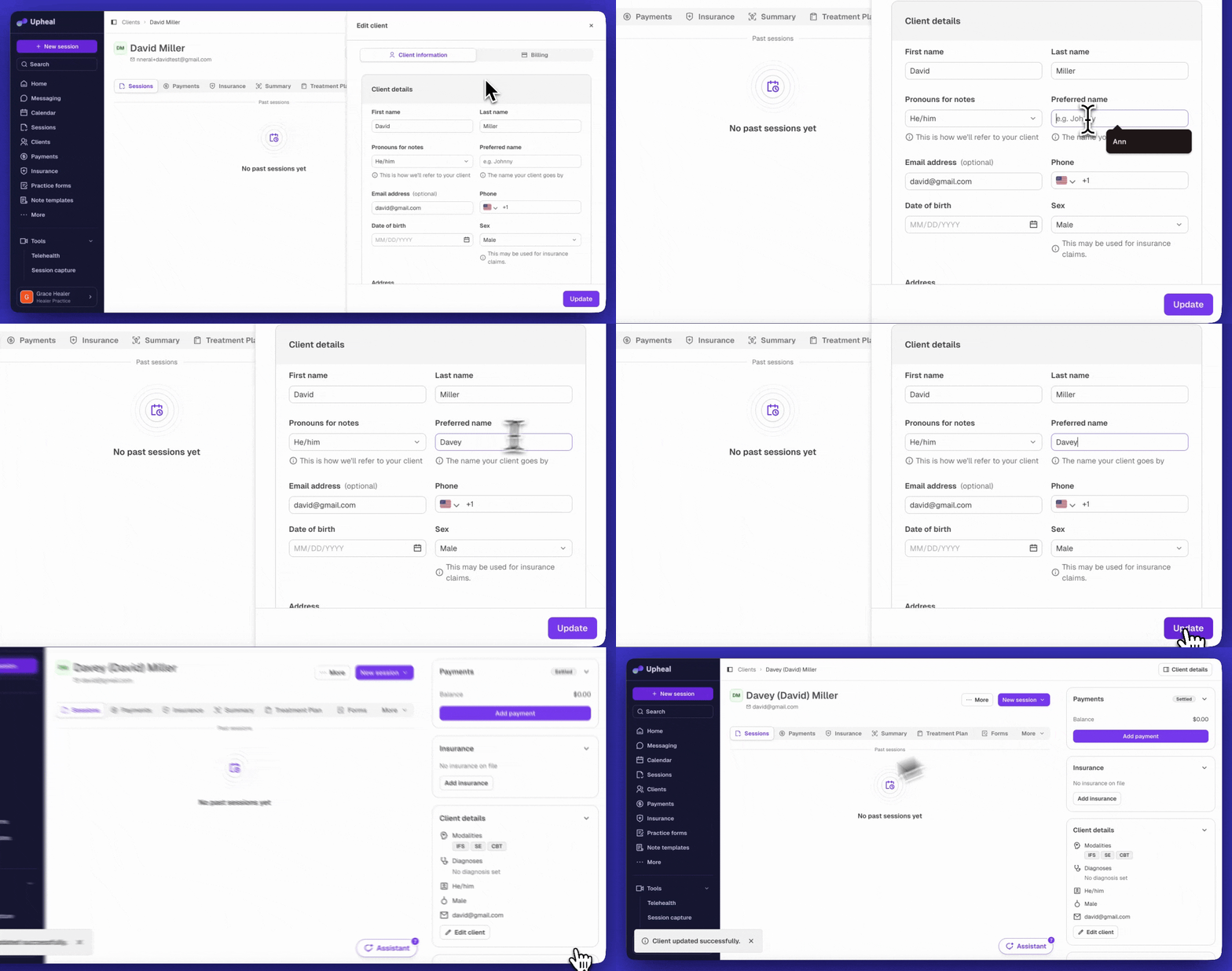
  • Preferred names: Clients can now go by a preferred name (like "Chuck" for Charles) across client lists, calendar, search, and session headers, while legal documents like claims and superbills keep their legal name.

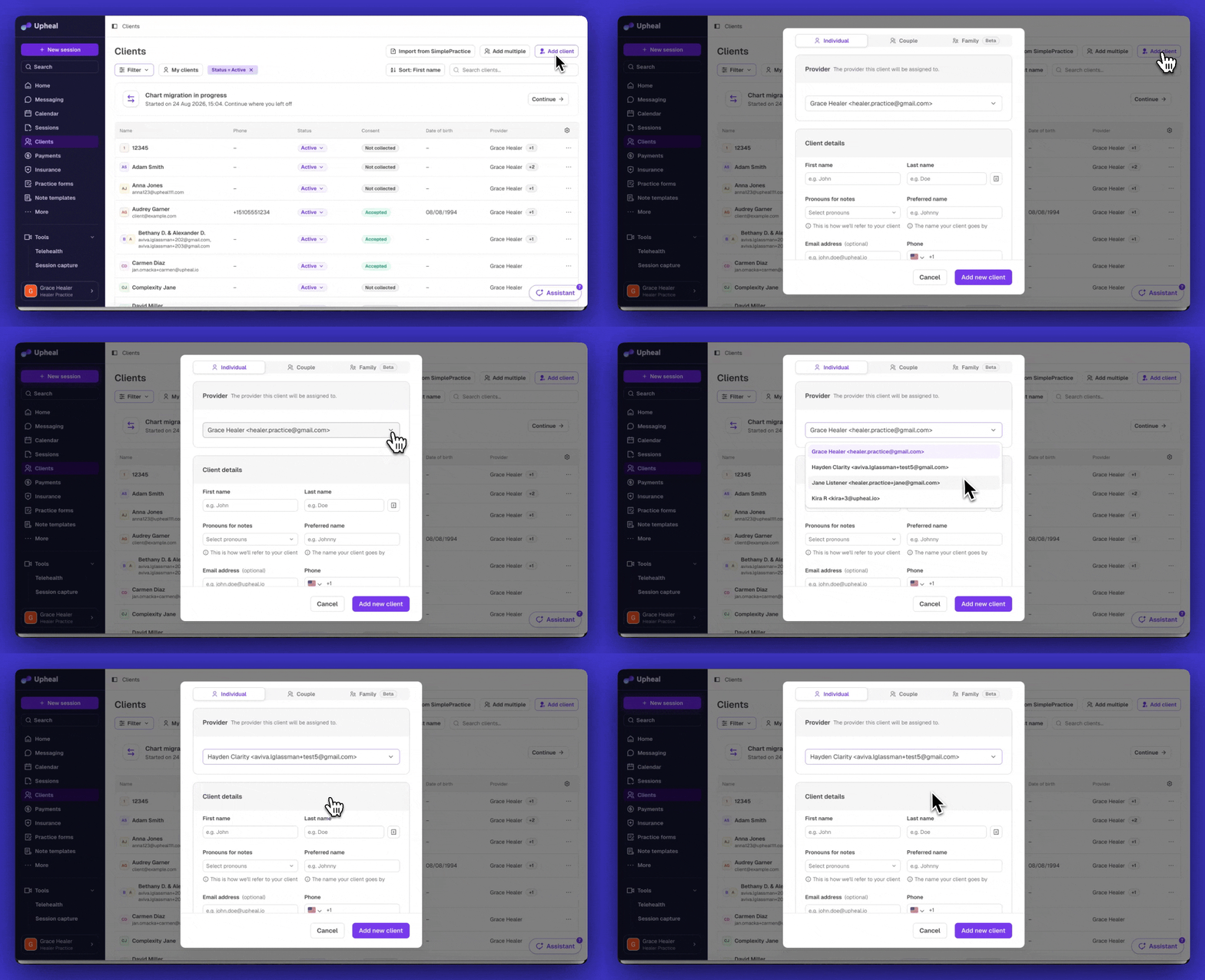
  • Provider select when adding a client: Org Admins can now choose which provider a new client gets assigned to right when they're added, no extra step needed.

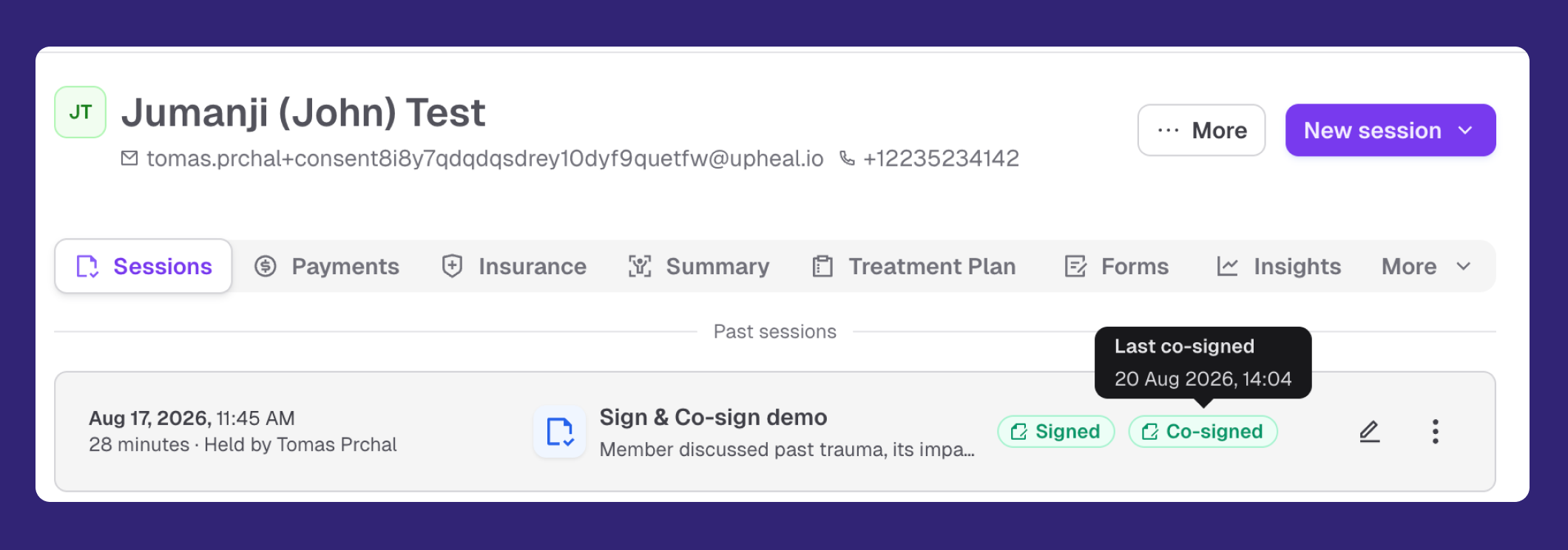
  • Notes can now be co-signed: Supervisors and co-treating providers can add their signature on top of the original one, right from a signed progress note. Co-signed sessions get a badge on the session list so supervision work is visible at a glance.

  • New roles for group practices: Biller and Practice Manager roles are on the way, so you can give staff exactly the access they need. If you're a group practice owner, set up a call with us to learn more.

Have a feature request or want to see what else is coming? Check out our roadmap →

Write a comment...

August 14th, 2026

We’ve made multiple improvements and updates to Upheal Assistant which can help you get answers quickly.

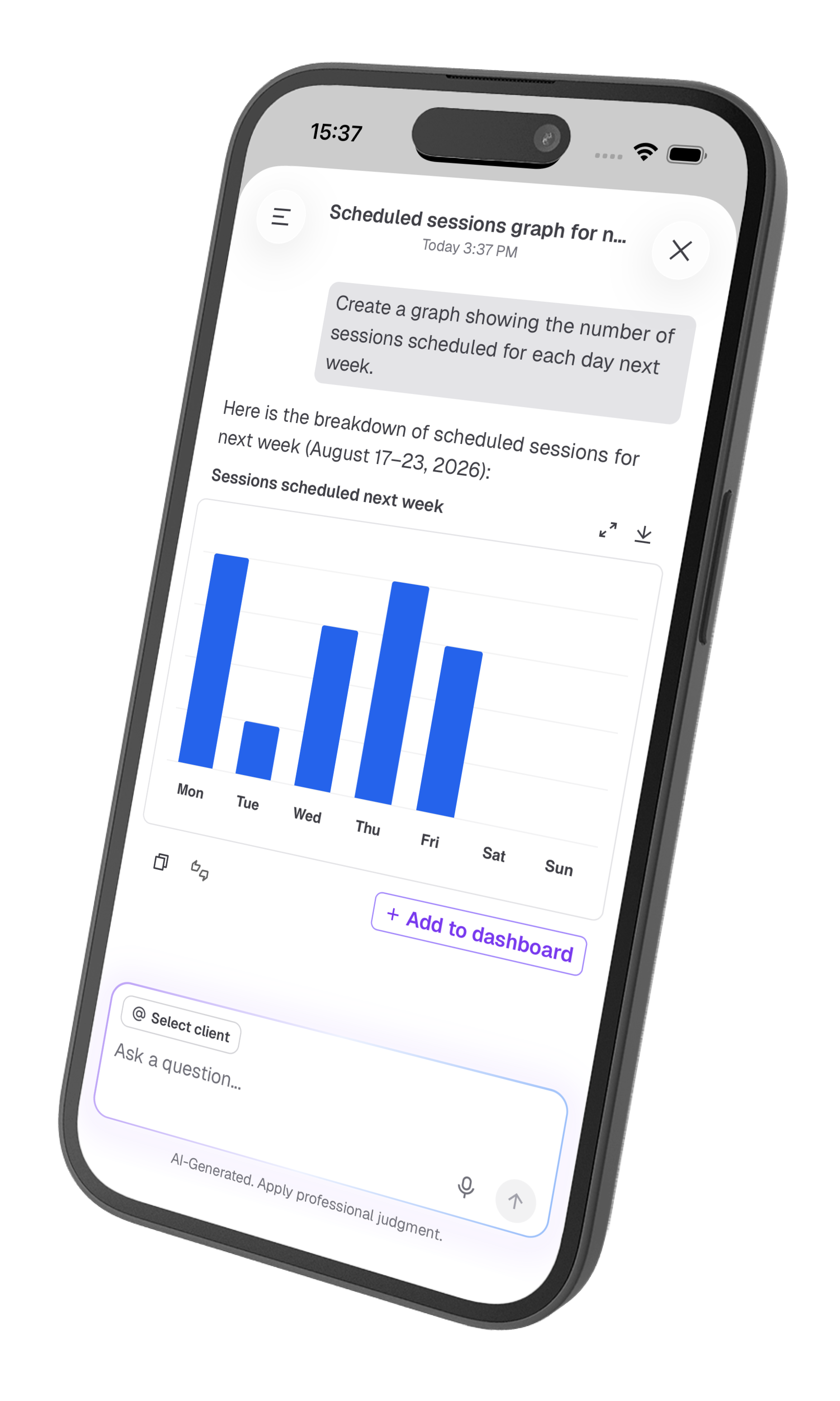
  • See your data as charts and tables: ask about your caseload or session trends and get a chart or sortable table back instead of a paragraph. Tables export to CSV; charts open in a larger view, and you can also download them.

  • Attach files for instant answers: drop a referral letter, assessment, or scanned form (PDF, photo, or CSV, TXT, MD, JSON files) right into the chat and ask questions about it. Upheal Assistant can work with very long documents, so there's no need to retype anything.

  • Switching from another platform: drop in an old treatment plan or record and ask the Assistant to pull out exactly what you need, with no retyping required.

  • Full-screen mode: open Upheal Assistant in a larger, distraction-free view when you need more room to work.

  • AI-generated chat titles: new conversations with Upheal Assistant are titled automatically, so your history is easier to scan back through and find a specific conversation.

  • Billing setup help: if you're getting set up with insurance billing, the Assistant can now walk you through onboarding questions as they come up.

Try it in Upheal Assistant →

Have a feature request or want to see what else is coming? Check out our roadmap →

Write a comment...

August 13th, 2026

Smart Edit has grown into something much bigger (and better). Instead of a separate in-text tool, you can now make changes through a real conversation with Upheal Assistant, for both notes and treatment plans.

What's new:

  • Select any text and ask for a change: highlight a sentence or section in a note or treatment plan (rich or plain text) and tell Upheal Assistant how you want it revised.

  • Edit a whole treatment plan at once: ask Upheal Assistant to update multiple areas of a plan at once, and it builds a step-by-step proposal for you to review. Stepping through it highlights exactly what changed and where.

  • Keep the conversation going: because edits happen through Assistant chat, you can follow up ("make it shorter," "add a goal for anxiety") instead of starting over.

  • Nothing saves unread: if you ask the Assistant to change a treatment plan mid-conversation, it surfaces an "Edit the Treatment Plan" button that drops you into edit mode, so no change goes in without you seeing it first.

Try it out →

Have a feature request or want to see what else is coming? Check out our roadmap →

Write a comment...